
I recently started helping a couple of therapists with their websites so people can find them. And to be honest, I’m still having my attorney draft my agreements, so I haven’t officially started the work yet, but I have started digging. The first thing I check now is something not many therapists know. In fact, I just learned about it even after being in technology for over a decade. Google Search Console! In this essay, I will… Kidding. I’ll try not to make it too much of an essay and more of a conversation about why you should set up Google Search Console if you haven’t already, and if you have, I’ll walk you through the first thing to check.
We’ll start with a checklist you can use. Each item is covered in detail in this post, so if you get confused, scroll down to read more or reach out.
Let's make sure Google can find you.
Seven small steps toward a more discoverable website. Check them off as you go!
Look what you accomplished!
YES!!! Look at you go. Understanding how Google sees your website is a great step toward helping people find your practice.
Let's make good care easier to find. 💚
What is Google Search Console and why should I care about it?
Great question, and I hear you! As a therapist, you probably have enough on your plate. SEO and Google Search Console may be the last thing you want to think about, but they could also be the one thing standing between your website and the clients you want to see.
Google Search Console is a free tool that helps website owners understand how Google actually sees their website. It’s basically a behind-the-scenes look at how Google sees your website. It can tell you:
What pages Google knows about
Whether Google can get to all the right pages
What people are searching that actually get your website seen
How often you show up in results
How often people click on your pages
If you have any tech issues you should check out that could be impacting any of these numbers
You don’t have to be super tech-savvy to use it because they try to make it user-friendly, although they don’t always succeed. So if you do not want to do it on your own or have no interest in reading further, but want someone to look at it, I volunteer as tribute and you can submit a form here for us to talk about what that may look like.
Anyway, if you do want to learn a bit about how to use it and what actually matters, that’s what this article is for.
What is page indexing, and why does it matter for therapists?
Okay, so you’ve done all the work to write all about the services you provide. If there’s one thing I’ve learned in my internship and in talking with other clinicians, it’s that no two clinicians are the same. We all tend to be good at something in particular and have a niche we are particularly good at working with and that lights us up like no other population does. (I’m just an intern, so I’m still finding mine, but all the experienced clinicians I’ve talked to seem to have a really good idea of who they are and who they can help.)
You could have written that page using all the right search keywords, explaining it perfectly, answering all common questions a client may have, and made it really easy for someone to request an appointment with you. It could be the most perfect page in the world, BUT if Google hasn’t indexed it, the page won’t appear as a search result. That means pretty much no one will find it unless they are specifically looking for you.
Page indexing happens in three steps:
Discovery: Google finds out about a page, whether it’s new or new-to-Google
Crawling: Google visits the page and looks at the content on it
Indexing: Google processes the information and may add the page to its search index
I like to visualize Google like a Roomba. You kind of have to help it along at times, or it can get stuck bumping into the wall over and over. Once these three steps are complete, your page can start showing up. Sometimes it still takes time or copy tweaks for the page to rank highly and show up first, though.
How do I check what pages on my site Google knows about?
Here’s where I like to nerd out. I’ll use screenshots of my own site to help. Funny enough, I hadn’t actually considered this for my own site, so you’ll be able to see that I ran into the same issues I’m about to tell you all about.
Step 1: Go to Google Search Console
First, go to Google Search Console and sign in or sign up. If you don’t already have an account, add your website and verify ownership. They make it relatively easy to do and if you’re using something like Wix or Squarespace, they provide step-by-step instructions to help you.
Once you’re in, you can view the reports. If you’ve just signed up and verified your data, it will take some time for Google to collect and display data. Usually, it is about 1-2 days.
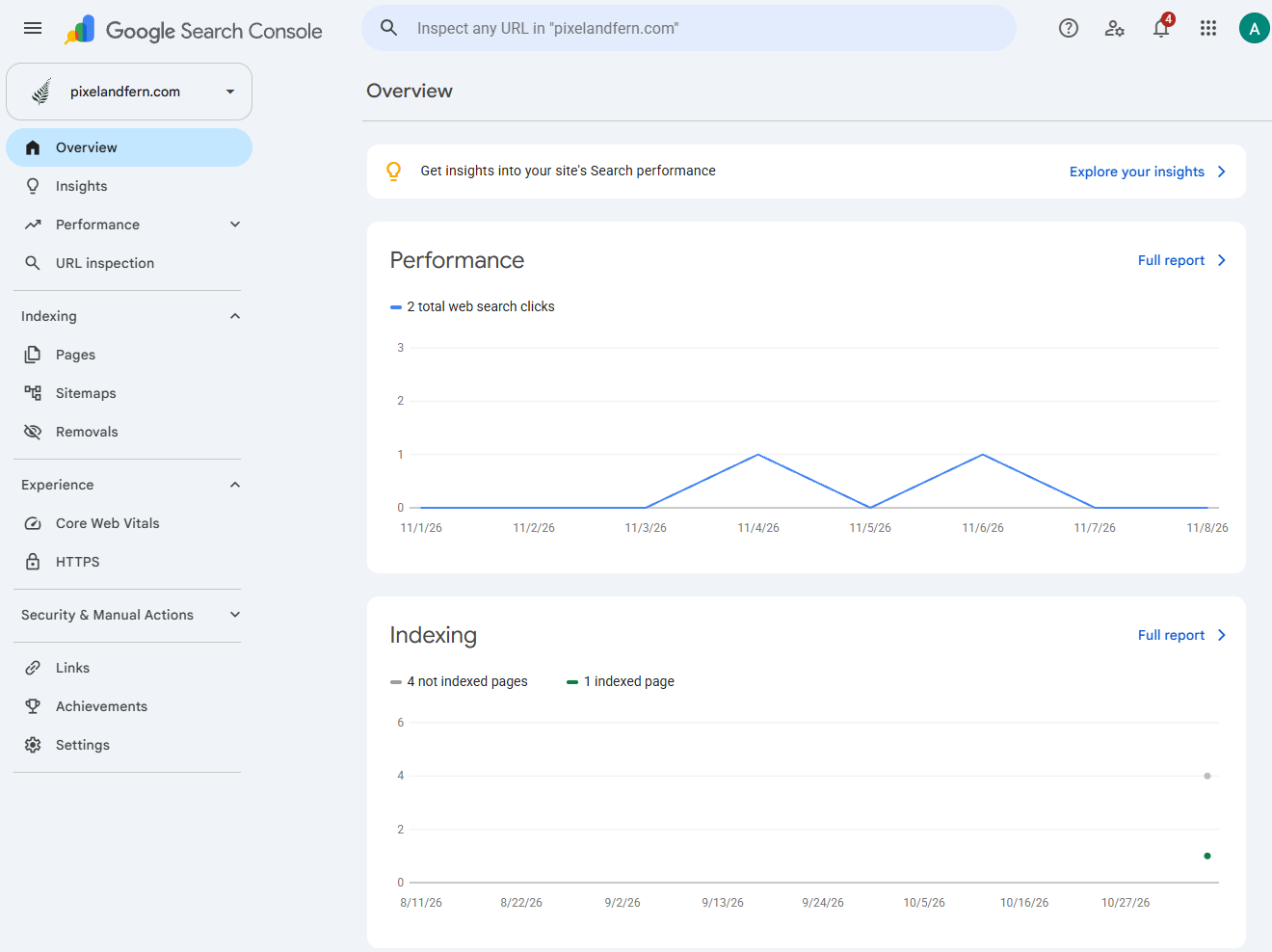
As you can see, my own search results are pretty dismal right now.
Step 2: Find Your Website’s Sitemap
Before you go page by page, I suggest checking for your sitemap first.
This is where I personally went wrong on my own site, and it’s where I’m finding most of the people I’m helping also need a loving nudge. That is actually why I checked my own.
If we stick with the Roomba reference, the site map is basically what guides the Roomba around. Sometimes, it can figure it out on its own, but other times, it needs guidance or a preferred path. I’ve never owned an actual Roomba before, but the videos I’ve watched about them always indicate that they can map out their own path, but they can also have a path you define. So, a sitemap is basically the same thing. My off-brand Roomba did its own thing entirely and never figured out my home, but that is a story for another day.
The sitemap is basically code that tells Google what all the pages you have on your website are and what URL they are at. Most websites have one that is automatically built. Sometimes, if you use plugins, you are able to create it in a specific way. Typically, your sitemap can be found at your base domain with /sitemap.xml at the end. For example, mine is: www.pixelandfern.com/sitemap.xml.
You’ll want to take a peek at your sitemap to make sure:
Your most important service pages are included on the sitemap
Any therapist pages if you’re a group practice are included
Blog articles, if you publish them, should also be included in the sitemap
Recently created pages are showing up on the sitemap
Step 3: Submit Your Sitemap to Google Search Console
Once you’ve verified that, you’re ready to add the link to Google. Without this, Google may not know what to even look for to start indexing all the cool pages you have created, so it’s important to check that. To do that, you just have to go to Sitemaps>Add a new sitemap>enter your URL, and submit.
If your site is like mine was, it may not know any of them at all, and you may have to submit a sitemap to it.
As you can see, I had to submit my sitemap and now Google knows there are 42 pages on my site rather than just one:
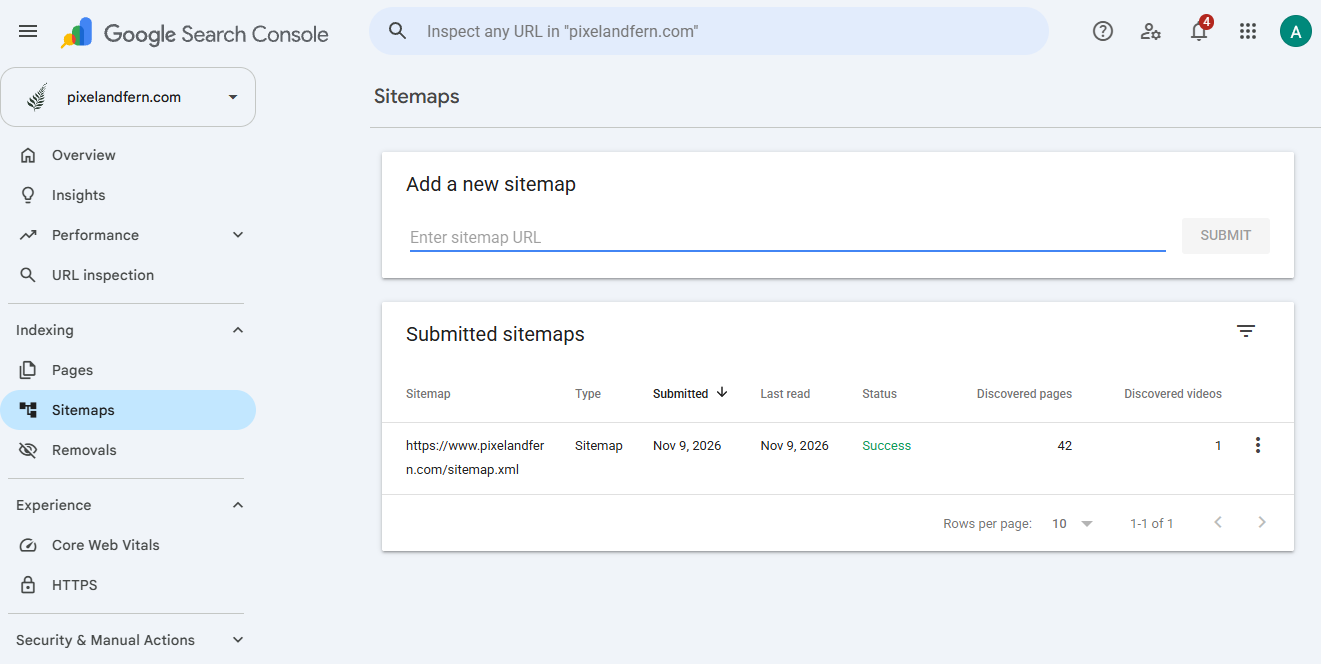
Once you’ve added your sitemap, Google will tell you whether it has read it or not and if it was successful or not.
There’s something I want to point out here, though. SEO is unfortunately not instant. I submitted my sitemap yesterday after finally noticing what was going on with my own site, and Google discovered 42 pages. That is great! However, I still only have one page indexed. Now, it’s the waiting game. It can take anywhere from just a few days to a few weeks for Google to slowly make its way through the new sitemap it now knows about. Crawling takes quite a while. And during crawling, Google is basically deciding if the page is worth showing up in search or not.
Step 4: Check Which Pages Are Actually Indexed For Your Site
So now that we’ve submitted our sitemap, it’s time to check our baseline. In Google Search Console, you can go to Pages under that same section. This will show you which pages are fully indexed and included in Google search results. This is the part that tends to shock me almost every time. For example, that’s how I found out only my homepage was indexed. But, for a few clients I have, I found that they had an extremely large number of pages that were not indexed.
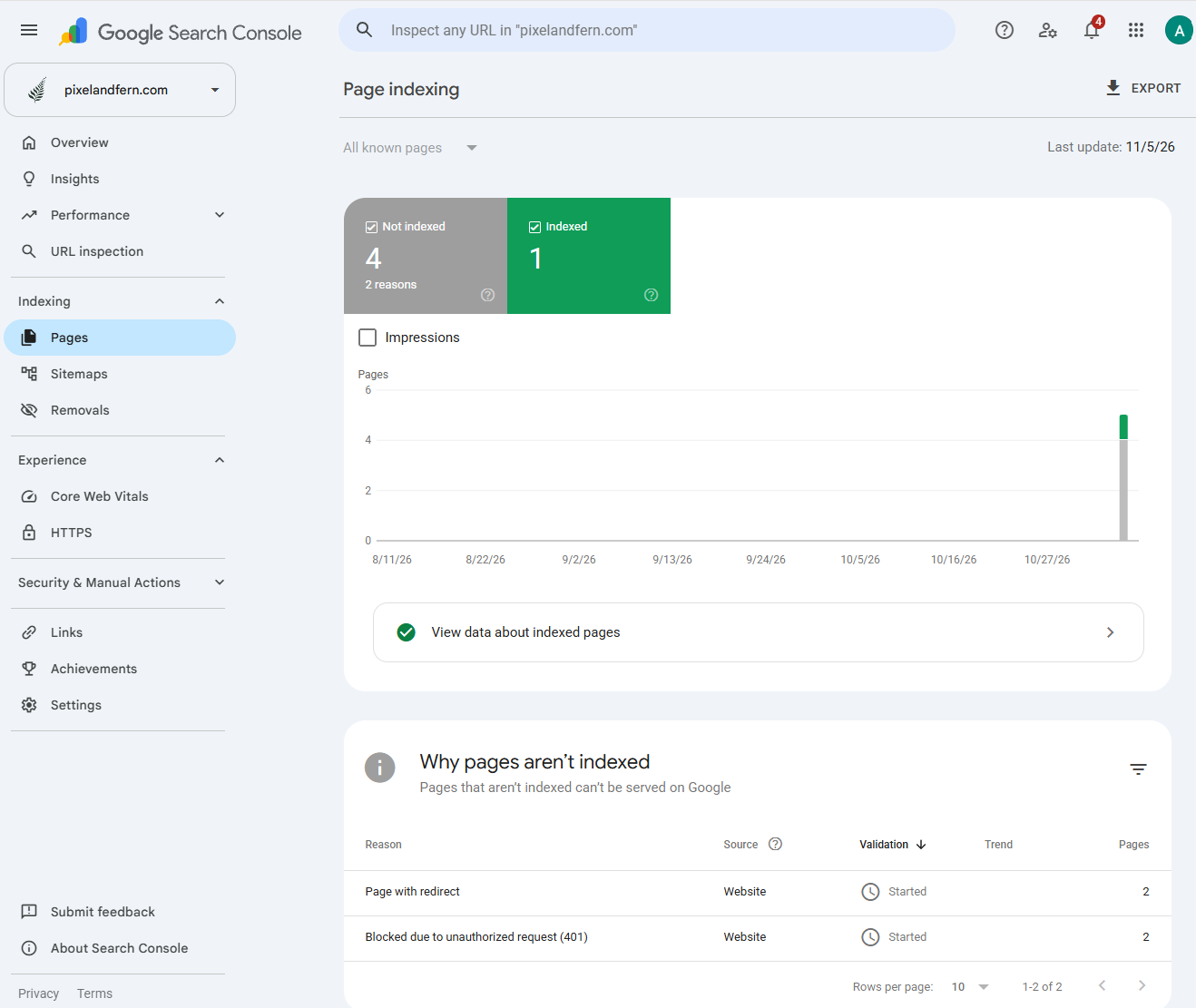
Here is my solo indexed page. Le sigh.
Luckily, Google gives us reasons why. And, luckily, not every URL needs to be indexed.
What?! I know, confusing. But, for example, Google has ways of finding things that really aren’t relevant to people. For example, one of the sites I work on has a page that literally just stores a picture to show on another page. Or, it has one of those “author” bios that I worked on unpublishing. Also, we have old pages that redirect somewhere else… There are all sorts of scenarios.
What you’re really looking for on pages is whether the pages you want people to find are indexed.
For a therapy practice, we want these pages to show up at least:
Homepage
Main services
Specialities
Location
Therapist profiles
Step 5: Check Individual Pages
Okay, now that you’ve done all that, you may have found a few pages that aren’t indexed and that you’d like to be indexed. We’ve submitted our sitemap, but that can take time to update, and if something like your homepage isn’t showing up, it makes sense to check if it can be indexed. Sometimes there are reasons the URL is not showing up, and this can help us troubleshoot and get your page found.
For example, here’s my services page. It wasn’t found because of the sitemap blunder I made, so I took three steps to request it start to be indexed;
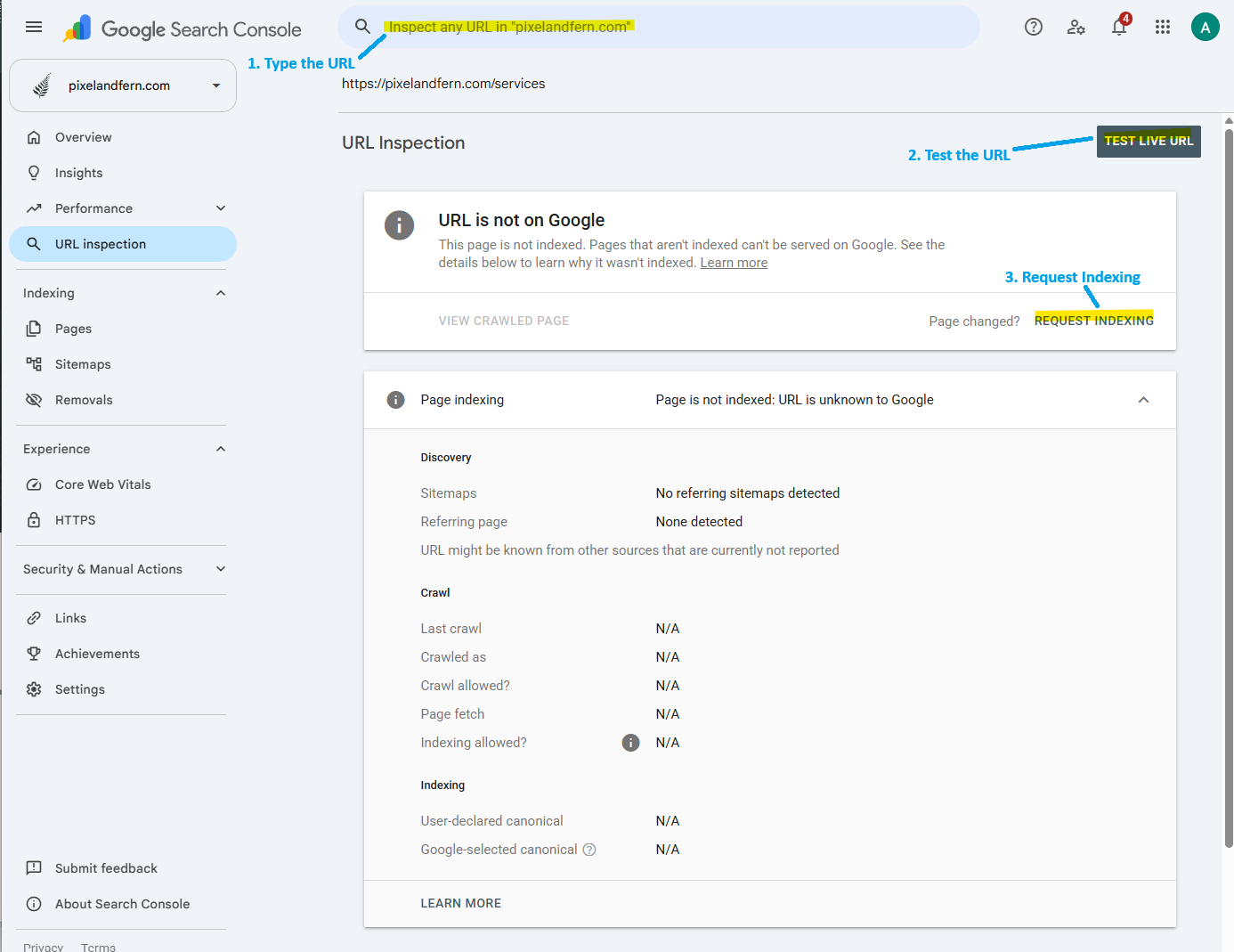
Number 1: Type the URL in the big search bar.
Number 2: Test the URL to see if Google can find it.
Number 3: Request for Google to index it!
This will tell you a lot about your site’s health and your next steps. If the URL isn’t on Google but is available to Google, you can hit that “Request indexing” button and wait for it to be indexed. Remember, it may still take a while for the page to actually start showing up. But you did what you could and got it in the queue. Now, you just sit back and wait.
So, what do I need to do to make sure Google Search Console is working for my site?
I just threw a lot at you, so don’t forget to use the checklist at the top of the page! The basic steps are outlined there.
What’s next?
This was fun to write, so I’m going to dive deeper into Google Search Console. I’ll cover common indexing problems and whether you need to worry about them, plus what to do if your pages ARE indexed but not getting found.
I know you probably didn’t become a therapist or open your own practice just to become an SEO and Google Search Console expert. As I’ve gone through school to become a therapist, I have realized how different SEO actually is for therapists, nutritionists, and others in the helper profession compared to regular sites. It gets complicated quickly, especially when HIPAA is involved. Which is almost always. So, if you’d rather have someone else investigate your website, identify opportunities, or just do this for you so you don’t have to worry about it, I again volunteer as tribute. Feel free to reach out, and we can see what I can help you with and whether we are a good fit to work together.